How we work
You can see everything. Your own client portal, from day one.
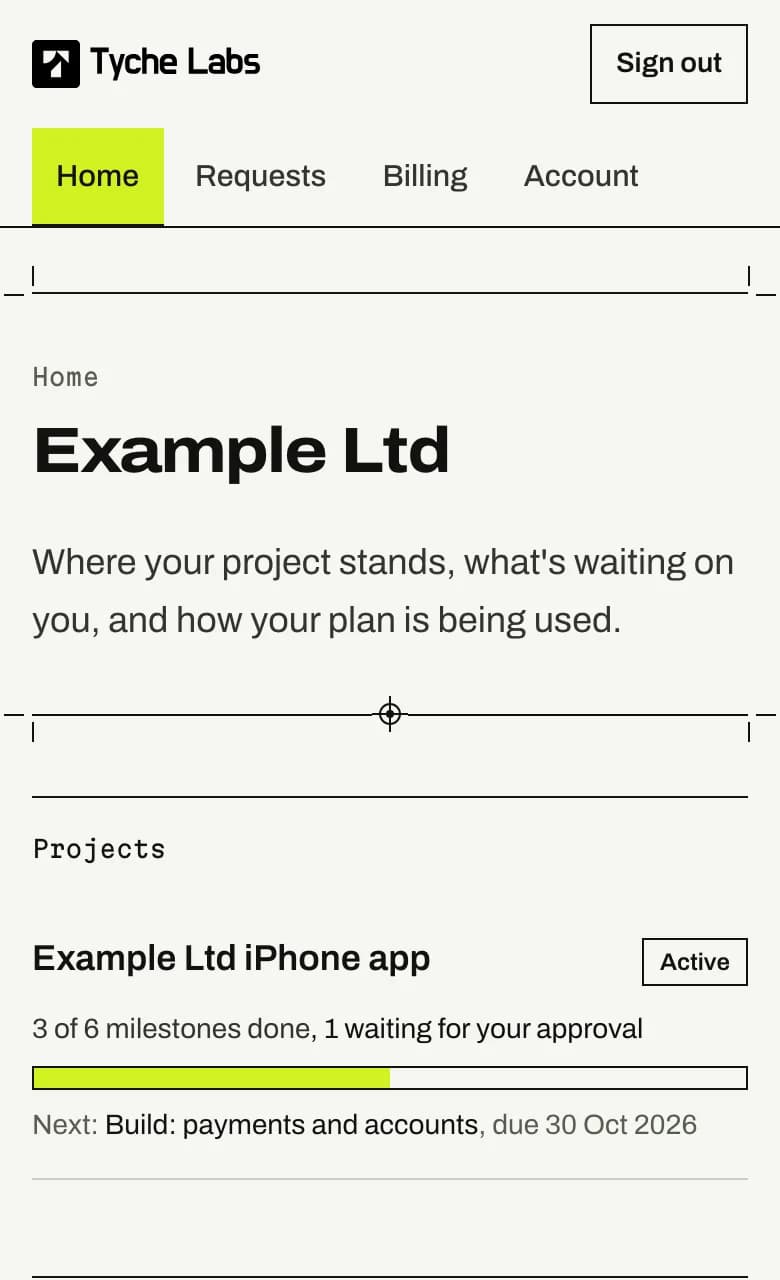
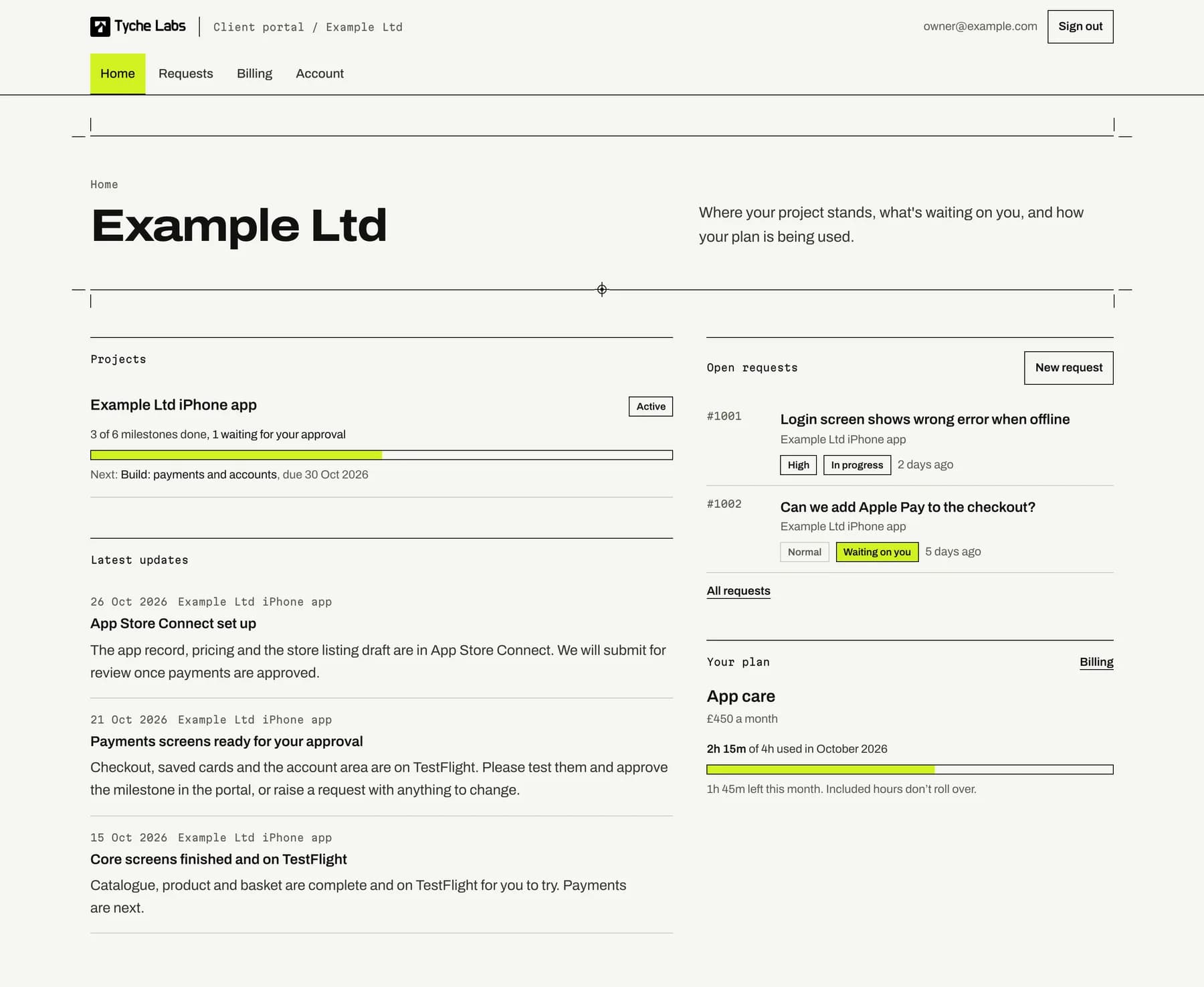
Every client gets a portal from the first day: milestones to approve, requests with response targets, plan hours month by month, documents, invoices and a written report. The screens on this page are the real portal, showing a demo client.
We reply within one working day.
One page that says where things stand
Most agencies send status by email, when asked. We would rather you did not have to ask. The portal home shows each project's progress, what is waiting on you, the latest notes from our team, your open requests and how much of this month's plan is used.
What every client gets
Included with every project and every plan. No extra tier, no per-seat charge, and your colleagues can join.
- Projects and milestones
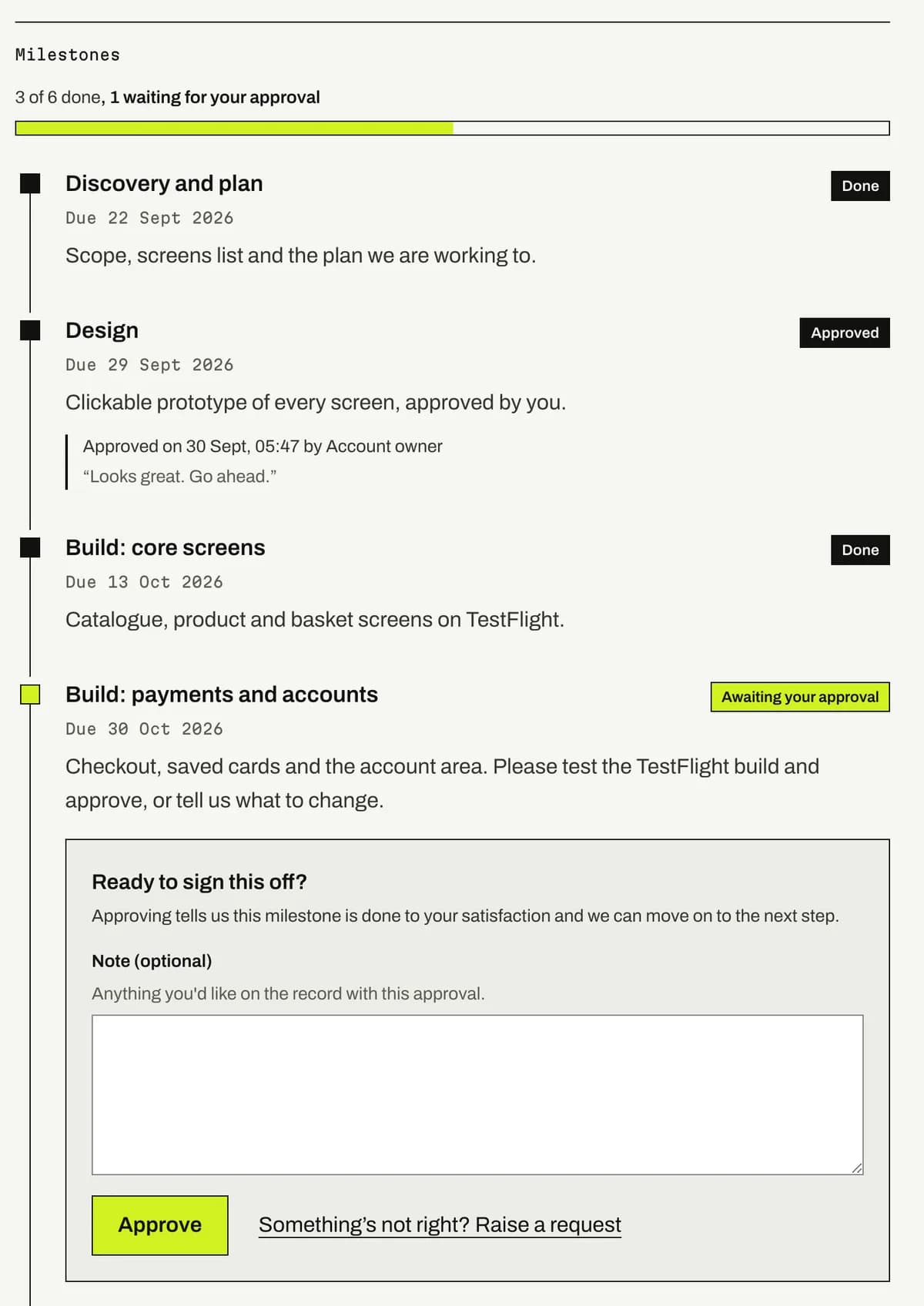
- Each project as a timeline of milestones with a due date and a status. When one is ready, you approve it in the portal; who approved it, when and any note is kept on record.
- Requests
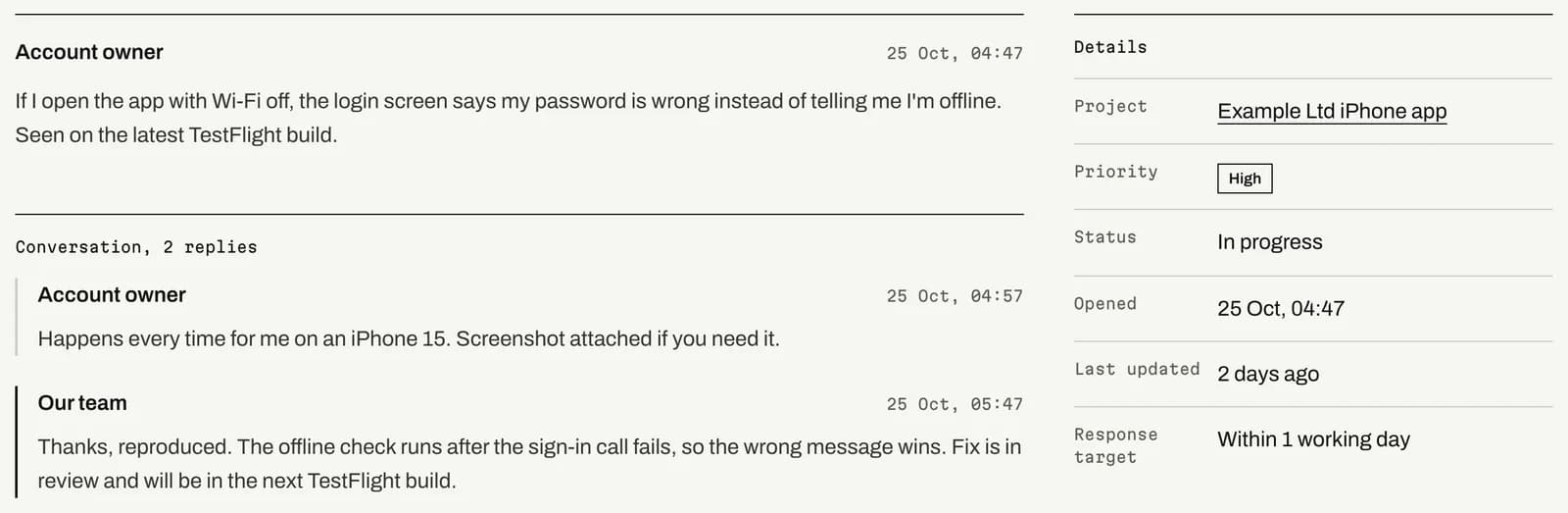
- Anything you need changed, fixed or looked at goes in as a request with a priority. Each one shows its response target, the conversation with our team, and any files either side attached.
- Plan hours
- On a monthly plan, the hours used so far this month against the included hours, with what is left. Time we do not charge for is shown too, marked as such.
- Documents
- Proposals, reports and anything else we share, plus the files you upload to a request. Downloads are private links that expire.
- Invoices and payment
- Your invoices, the date of the next one, and your payment method, managed through Stripe's secure billing page.
- Monthly report
- On the 1st, plan clients get a written report: what we did, time used, requests resolved and open, milestones done and what comes next. It is emailed and kept in the portal.
Projects
Milestones you sign off, in order
A project is a list of milestones with dates, set when the scope is agreed. Each one is planned, in progress, awaiting your approval, or done. When a milestone is ready, the portal tells you by email, you look at the build or the prototype, and you approve it there, with a note if you want one on record.
Nothing moves to the next stage until the one before it is signed off, so there is never a question of what was agreed or when. The approval shows who gave it and when, for as long as the project exists.
The four stages
Fixed for every project, whatever its size. Each stage ends with something you approve in the portal before the next one starts.
Stage 1
Discovery and planning
We learn how the business works, who the users are and what the first release has to do, then agree a plan.
Scope agreed
Stage 2
Design and prototyping
Screens and flows you can click through and comment on before production code is written.
Prototype approved
Stage 3
Development and testing
Built in short cycles, with working builds to try along the way and regular updates in plain English.
Build accepted
Stage 4
Launch and support
Release to the web or the App Store and Google Play, a clean handover, and maintenance afterwards.
Live
Requests
Requests with a response target you can see
A bug, a change, a question: raise it as a request, pick a priority, attach a screenshot if it helps. The request shows the target for our first reply and the whole conversation, so nothing lives in someone's inbox.
Response targets
- Urgent
- 4 working hours
- High
- 1 working day
- Normal
- 2 working days
- Low
- 5 working days
How the targets work
- Targets count London working hours: Monday to Friday, 09:00 to 17:30, not bank holidays.
- The target is for our first reply, not for the fix. The reply says what we found and what happens next.
- The clock stops while a request is waiting on you and starts again when you answer.
- Urgent is for a live app or site that is down, rejected or losing you customers. Most requests are normal.
Monthly plans
Plan hours, month by month
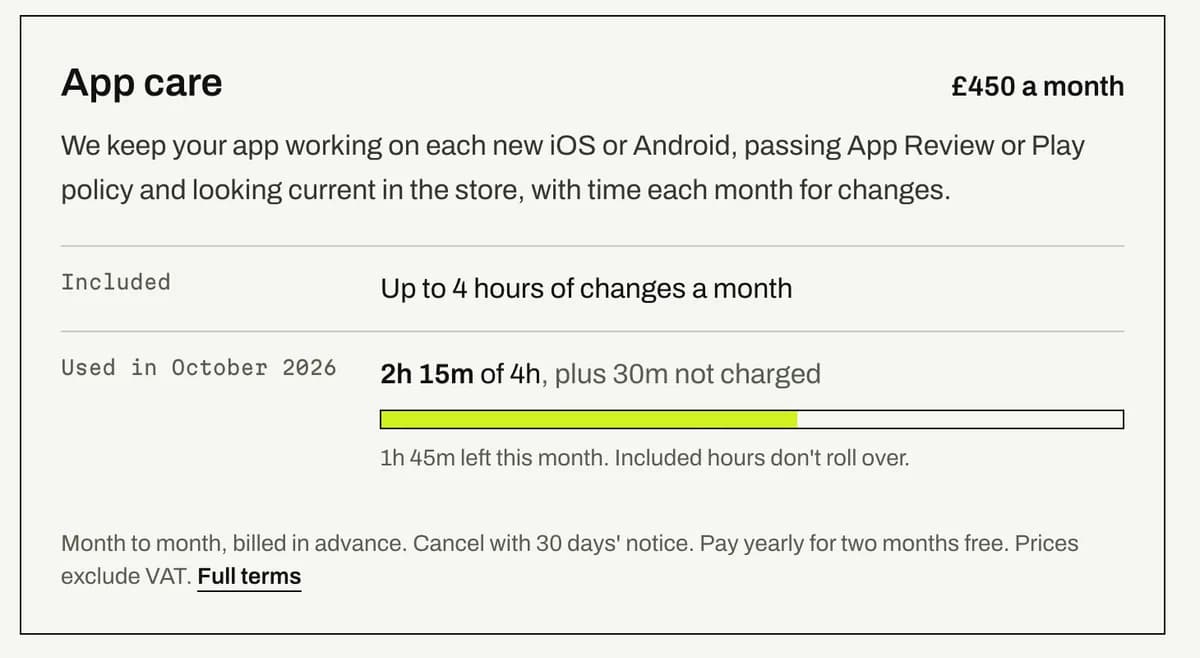
Every plan includes time each month for changes. The portal shows the hours used against that allowance as the month goes, entry by entry, so the monthly report never comes as a surprise.
- Only time we bill against the plan counts. Fixing our own mistakes and internal review are logged so you can see them, but never charged.
- Included hours are per calendar month and do not roll over.
- If a month runs over, the portal says so and we talk to you before anything beyond the plan is charged.
- A late entry lands in the month the work was done, so a report never shifts after you have read it.
Included time by plan: Website care up to 1 hour of small edits a month, Website care Plus up to 3 hours of changes a month, App care up to 4 hours of changes a month and Ongoing development 2 reserved build days a month, more if you need them.
Documents, invoices and the monthly report
- Documents
- The proposal, reports and anything else we share sit against the project. Files you attach to a request stay with it. Up to 25 MB a file; anything bigger goes by link. Downloads are private links that expire after a few minutes.
- Invoices and payment
- Plans are billed in advance by card or Direct Debit through Stripe. The billing page lists your invoices and the next invoice date, and opens Stripe's secure page to change the payment method. We never see your card number.
- Monthly report
- On the 1st, every plan client gets a written report by email: what we did, time used against the plan, requests resolved and still open, milestones done and what is next. Each person chooses whether to receive it.
- Signing in
- No passwords. You ask for a link, it arrives by email and works once. The account owner adds colleagues from the Account page. The portal runs on Google Cloud in London, sets one cookie, and loads no analytics or third-party scripts; the privacy notice lists exactly what it stores and for how long.
Written into the plan terms
- Cancel any time with 30 days' notice; we hand over code, hosting and store access in full.
- Included hours are per calendar month and don't roll over; work beyond them is quoted first.
- You get a short written report each month and a review call every quarter.
Questions we get asked
It is included with every project and every monthly plan, at no extra cost. There is no basic tier without it: the portal is how we run the work, so every client gets the same one from the first day.
No. When we set up your company we add your email address, and you sign in by asking for a link, which arrives by email and works once for 15 minutes. After that you stay signed in on that device for 30 days. There is no password to set or lose.
Yes. The account owner can add colleagues from the Account page; each person gets their own sign-in and sees the same projects, requests, documents and billing. Owners can add and remove people; members can do everything else. Each person chooses which emails they get.
Each request has a priority with a target for our first reply, in London working hours: urgent 4 working hours, high 1 working day, normal 2 working days, low 5 working days. The target is shown on every request. It covers the first reply, which tells you what we found and what happens next, not the time to finish the work.
The project is marked complete and everything stays in the portal: the milestones, approvals, documents and the record of requests. If you take a monthly plan, the same portal shows your plan hours each month and carries on taking requests, and you get the written monthly report. If you do not, the portal stays open and you can still raise a request; we quote anything larger first.
Yes. Your code, accounts and store listings are in your name throughout, so there is nothing to hand back. For the portal itself, email info@tychelabs.net and we send an export of everything it holds about your company: projects, milestones, approvals, requests and replies, time logged, updates and a list of documents. We keep contractual records for the length of the contract plus six years and requests for 24 months after a request is closed, as the privacy notice sets out, and delete the rest when you ask.
Where to start
- Fixed-price offers
- After launch
- Already a client
See it with your own project in it.
Tell us what you're building. If we go ahead, your portal is set up before the first milestone, and you follow everything from there.
We reply within one working day. Or call 020 3540 5048