Teleprompter app vs Autocue: what an autocue is and which you need
Autocue is a company and brand, and in British English the word is used for any teleprompter. The real choice is not app or autocue but where the text sits: on glass in front of the lens, or on a screen beside it.
By our team. Published . 6 sources.
An autocue and a teleprompter are the same kind of device: a screen that shows a presenter their script while they look at the camera. Autocue is the name of a British company that has made prompters since 1955 [1], and in UK English the brand name is used for teleprompters in general; the Cambridge Dictionary lists Autocue as a UK trademark, with "teleprompter" as the US word [2]. So "teleprompter app vs autocue" is really a question about hardware: should you read from an app on the device that is filming you, or from a glass prompter in front of the lens?
Short answer: for one person filming themselves on a phone or tablet at arm's length, an app showing the script right under the lens is usually enough. Glass hardware wins for close-ups on a proper camera, long scripts, live work and anywhere a crew is involved.
What is an autocue?
The word has two meanings, and it helps to keep them apart.
Autocue, the company. Autocue says it has been making prompters since 1955, that its first product used a design by Jess Oppenheimer, the creator of the CBS sitcom I Love Lucy, and that it made the first through-the-lens prompters [1]. Today its website lists camera prompters, prompting software and accessories for video production, corporate, studio and conference use [3]. Its website links to Videndum Production Solutions [3].
Autocue, the everyday word. In Britain people say "autocue" the way they say "hoover": for the general thing, whoever made it. A news presenter "reading the autocue" may be using a prompter from any manufacturer. In American English the same device is called a teleprompter [2].
When you write about the equipment in general, "teleprompter" or "prompter" is the neutral term. Use Autocue with a capital A when you mean the company or its products.
How a hardware prompter works
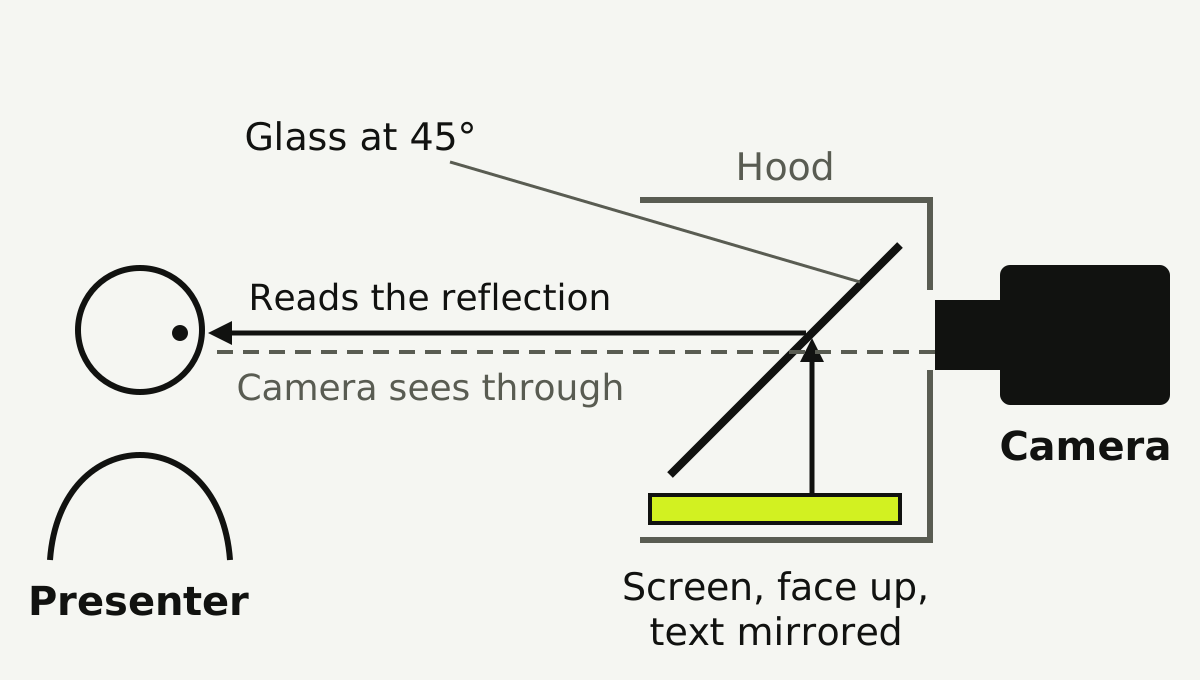
A camera prompter puts a sheet of partly mirrored glass, often called beam-splitter glass, at 45 degrees in front of the lens. A screen lies under it, facing up. The presenter sees the screen reflected in the glass; the camera looks straight through the glass and does not see the text [4]. Because you are reading a reflection, the text has to be shown mirrored so it reads the right way round in the glass [4]. A hood around the glass keeps stray light from washing out the reflection.
The point of all this is that the words and the lens are on the same line of sight. Wherever you look in the text, you are looking down the lens.
There is a cost. The glass passes only part of the light to the camera, so you need a little more light on the presenter, and the rig adds size and weight to the front of the camera. A large prompter also needs a stand or rails strong enough to hold it.
How a teleprompter app works
A teleprompter app is software that shows and scrolls a script. It can be used in two quite different ways.
On the device that is filming. The phone or tablet records through its front camera and shows the script on the same screen, usually just under the lens. There is no glass, so your eyes are slightly off the lens axis. This is how most creators use a prompter app.
As the screen inside a glass rig. Many small prompter rigs are built to hold a phone or tablet underneath the glass. Here the app is just the display, with its mirror setting on, and a separate camera films through the glass. The app is doing the job of the monitor in the diagram above.
So the honest comparison is not app against hardware, it is text beside the lens against text on the lens.
Side by side
| Prompter app on the filming device | Glass prompter (app or monitor underneath) | |
|---|---|---|
| Where the text is | On screen, just below the lens | Reflected in glass, on the lens axis |
| Eye contact | Very good at arm's length or more; eyes slightly low up close | Reads as direct eye contact even in close-up |
| Camera | Usually the phone or tablet's front camera | Any camera, including the phone's main rear camera |
| Setup | Open the app and press record | Mount the glass, hood and screen, mirror the text, align with the lens |
| Size | Fits in a pocket | From a small phone rig to a studio unit |
| Light | No loss | The glass costs some light; add light on the presenter |
| Running the script | The presenter, by time or by voice | The presenter, or an operator with a controller |
| Suits | Solo creators, social video, quick updates, travel | Close-ups, long reads, interviews, studios, live events |
When an app on the filming device is enough
- You film yourself on a phone or tablet. The front camera is right next to the text, and modern front cameras are good: on iPhone 17, for example, Apple lists an 18MP front camera that records 4K video at up to 60 frames per second [5].
- You can sit back. At an arm's length or more, text just under the lens moves your eyes only a degree or two, which most viewers will not notice. A study of eye contact over video found people are about ten times less sensitive to a gaze that falls slightly below their eyes than to one that moves sideways or up [6], which works in favour of text placed under the lens.
- You shoot short pieces often. No rig to build means you will actually film.
- You travel or film on location. The whole kit is the phone and a small stand.
When hardware wins
- Tight close-ups. When the face fills the frame, even a small downward glance shows. Glass removes it.
- A better camera. If you film on a mirrorless camera, or want your phone's main rear camera rather than its front one, the text has to go somewhere in front of that lens. On iPhone 17, Apple lists a 48MP main rear camera with sensor-shift stabilisation, against the 18MP front camera [5].
- Long scripts. Over a long read, the small strain of reading beside the lens adds up, and the larger text on a rig is easier.
- Someone else runs the script. In studios and at events, an operator usually controls the scroll, which needs a prompter with separate control.
- Live speeches. Conference and podium prompters are a different product: glass panels the speaker reads while looking at the audience. A phone cannot do that job.
Using an app with a glass rig
If you want glass-quality eye contact without studio kit, a small phone or tablet rig is the middle ground:
- Put the camera behind the glass so the lens is centred in the opening.
- Put the phone or tablet face up under the glass and open the prompter app.
- Turn on the app's mirror setting so the text reads correctly in the reflection.
- Fit the hood and lower the screen brightness until the text is clear but not glowing.
- Check the camera's view: you should see the presenter clearly and no text.
Which should you choose?
Start with an app on the device you already have. If you find yourself filming tight close-ups, wanting a better camera than the front one, or reading long scripts every week, add a glass rig and keep using the same app underneath it. Buy studio hardware when there is a studio, an operator or a live audience to justify it.
Common questions
- Is an autocue the same as a teleprompter?
- Yes, as a device. Autocue is a British company that has made prompters since 1955 [1], and in UK English its name is used for teleprompters in general. The Cambridge Dictionary lists Autocue as a UK trademark and gives teleprompter as the US word [2].
- Why do British people say autocue?
- Because the Autocue brand became the everyday word for the device in the UK, in the same way that hoover is used for vacuum cleaners. Americans say teleprompter for the same thing [2].
- Can I use my phone as an autocue?
- Yes. A teleprompter app can show your script just under the front camera while the phone films you, or the phone can sit under a glass rig, with the text mirrored, while another camera films through the glass.
- Do teleprompter apps look as natural as a real prompter?
- At arm's length or further, an app with the text right under the lens can look very close, because your eyes only move a degree or two and viewers are less sensitive to a gaze slightly below their eyes [6]. In tight close-ups, glass on the lens axis still looks more natural.
- Why is the text mirrored on a teleprompter?
- On a glass prompter you read a reflection of the screen, which reverses the text, so the screen shows it mirrored to cancel that out [4]. On a phone or tablet filming you directly, the text is shown normally.
- Does teleprompter glass affect the picture?
- It costs some light, because the glass reflects part of the light and passes the rest to the camera, so you may need a little more light on the presenter. With a hood fitted and the glass clean, the camera does not see the text.
Sources
Checked on 5 November 2026.
- 1.Autocue, "Our story" (since 1955, Jess Oppenheimer design, first through-the-lens prompters): https://www.autocue.com/our-story/
- 2.Cambridge Dictionary, "Autocue" (UK trademark; US: teleprompter): https://dictionary.cambridge.org/dictionary/english/autocue
- 3.Autocue, home page (products, markets and link to Videndum Production Solutions): https://www.autocue.com/
- 4.Glide Gear, "The science behind teleprompter beam splitter glass": https://glidegear.net/blogs/news/the-science-behind-teleprompter-beam-splitter-glass
- 5.Apple, iPhone 17 technical specifications (front and rear cameras): https://www.apple.com/iphone-17/specs/
- 6.Chen, M. (2002), "Leveraging the asymmetric sensitivity of eye contact for videoconferencing", CHI 2002, Stanford University: https://graphics.stanford.edu/papers/eye_contact/