Cuefold, the teleprompter camera by Tyche Labs
An iPad teleprompter for presentations you record
Prop up your iPad, read your talk to its front camera, and get back one clean video with the stumbles taken out. Works with a keyboard or page-turner.

Free on iPhone and iPad. Free exports carry a small Cuefold watermark.
An iPad makes a good recording studio for a talk: a big screen to read from, a decent front camera, and it stands up on its own. Cuefold turns it into a teleprompter that records you and edits out the mistakes.
Made for presentations you record
- Video lessons and course modules
- Conference talks recorded ahead of time
- Investor pitches and product demos
- Team updates, training and onboarding videos
- Webinar intros and outros
Setting up
- Stand the iPad on a stand or case at eye level, with the front camera at the top edge.
- Write or import your talk. Paste your speaker notes or import a text, Markdown, RTF or PDF file. Each sentence becomes a line.
- Pick a shape. Widescreen 16:9 suits slides and video platforms; turn the iPad sideways for full-quality widescreen.
- Record. The script sits at the top of the screen, just below the camera, with your current line on a yellow bar. Voice Follow keeps pace with you.
Control it like a clicker
Pair a Bluetooth page-turner or keyboard: Space pauses the prompter, the arrow keys move between lines and Return starts and stops a take. A Bluetooth camera remote starts and stops recording too, so you can stand back from the iPad.
No need for a perfect run
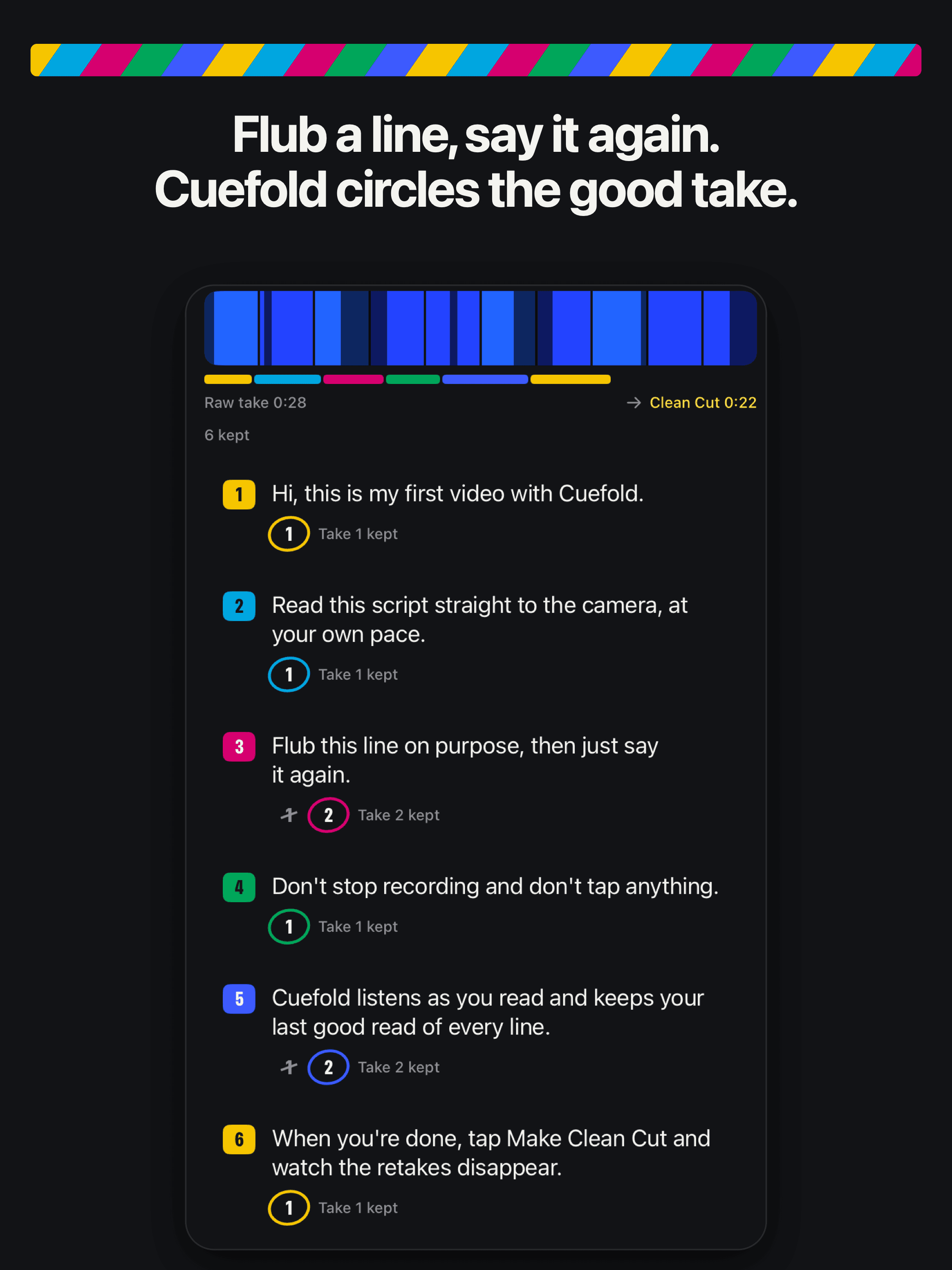
Long talks rarely go right in one pass. With Cuefold you don't need them to: when you stumble, repeat the sentence and carry on. Clean Cut keeps your last good read of every line and joins them into one video. Swipe a line to use a different read, then save it to Photos or share it.
Big screen, big text
The iPad's screen leaves room for larger text you can read from further back. Pinch to resize while you set up, and choose a font that reads easily at a distance.
Cuefold is free to download. Recording, the prompter with Voice Follow and Clean Cut are free; free exports carry a small Cuefold watermark. Cuefold Pro removes it and adds captions, 4K, unlimited scripts and the script writer.
Common questions
- Does Cuefold work on iPad?
- Yes. Cuefold runs on iPad and iPhone with iOS 26 or later, with layouts made for the iPad's larger screen.
- Can I control the teleprompter with a clicker or keyboard?
- Yes. With a Bluetooth page-turner or keyboard, Space pauses the prompter, the arrow keys move between lines and Return starts and stops a take.
- Can I use Cuefold for a live talk in front of an audience?
- Cuefold is made for presentations you record: the prompter runs on the record screen while the camera films you. For a live talk, record a rehearsal and play it back to check your pace.
- How long can a recording be?
- There's no recording length limit in Cuefold. Clean Cut works on the whole take, line by line.